|
1
|
- CALICO ‘99
- Lori Williams / Christine Bauer-Ramazani
- Saint Michael’s College
- e-mail: lwilliams@smcvt.edu
- cbauer-ramazani@smcvt.edu
|
|
2
|
- Initiated by a faculty member, NOT an institutional decision
- Project team formed to respond to needs of GSL520 both as an on-campus
class as well as a DE course
|
|
3
|
|
|
4
|
- Electronic Reserves
- Will material scan well to be formatted for Acrobat Reader?
- How will overseas sites have access to electronic reserves?
- Permission from authors to transfer formats?
|
|
5
|
- GSL520 Website
- Ongoing maintenance
- Assistance in creating forms - Student Information Form
- Access to user documentation for:
- word processing
- email
- web authoring
- MS-PowerPoint--Basic
- password protection of website
|
|
6
|
- Software & Hardware
- Pueblo for SchMOOze University
- digital camera
- microphones and headsets
- software installation for demos
- Space to save multimedia projects
- web space?
- virtual drive on network?
- public folder in MS Exchange?
|
|
7
|
- Synchronous
- NetMeeting
- Asynchronous
- email distribution
- public folder
- virtual drive
- online journal
- message board
|
|
8
|
- support of faculty for course(s)
- understanding of how delivery of courses would differ from traditional
means and still retain pedagogical quality
- training in use of technology
|
|
9
|
- New Role for teacher
- facilitator who provides context & instruction for the mode of
interaction to take place and the dissemination of information
- receives & evaluates information & feedback
|
|
10
|
|
|
11
|
|
|
12
|
- Funding support & compensation
- In-house solutions
- increased support staff for technical support
- faculty development grant
- Financial aid (workstudy student)
- Outsourcing solutions
- instructional design consultant
- web course management tools investment
- turnkey solution (Campus-wide Services: Registrar, Bursar, Library,
Student Services)
|
|
13
|
- Compensation
- Release time for course development
- Additional compensation for time consuming online delivery feedback
- Satellite campuses
- onsite facilitator - curricular support
- technical contact - technical support
|
|
14
|
- Selecting a course for online
delivery: Why Computer-Assisted
Language Learning?
- Personal interest / motivation
by the faculty member teaching it
|
|
15
|
- Selecting a course for online
delivery: -- Why Computer-Assisted
Language Learning?
- Personal interest / motivation
by the faculty member teaching it
|
|
16
|
- Possibility for students to learn about the technology (its strengths as
well as its limitations) by actually using it
- Built-in experimentation with technology: HOW TO’s
|
|
17
|
- Electronic communication of results of experimentation to the instructor
and/or the class via S T
e-mail, class e-mail (distribution list), comments in the online class
discussion forum, comments in the individual student’s online journal
|
|
18
|
- Experimentation limited to capabilities of technology available to all
students
- Limited to using the lowest common denominator technology / possible
equipment incompatibility
- Many advanced types of technology may not available in overseas sites (processor
speed, fast Internet connection, communication software)
- Slow Internet connections (14.4 bps modems, no T1 lines), slow down-
& uploads
|
|
19
|
- Possible equipment incompatibility
- Internet congestion at peak times
- Unreliable Internet connections/ intermittent service overseas (Colombia)
- Time zone differences
- Students must have basic computer competence, facility with basic
troubleshooting, and certain confidence level
- approximately double the preparation time for faculty member
|
|
20
|
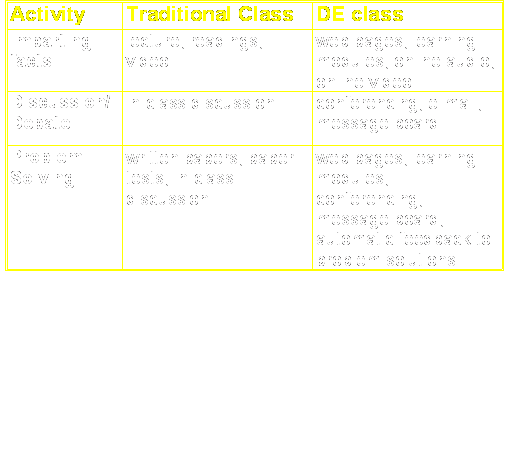
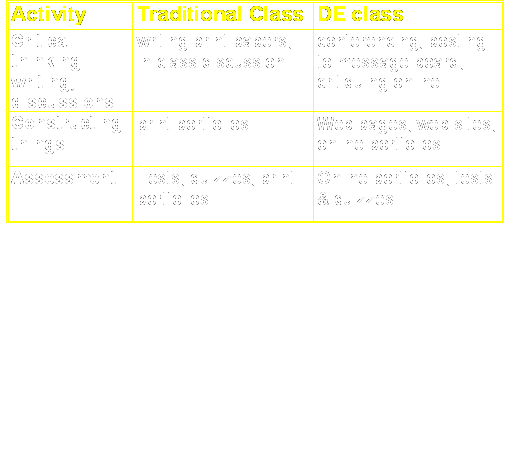
- Course Information: Syllabus,((Course description, Course Requirements,
Evaluation), Course Calendar (with
Links to Class Assignments & Readings), Texts and Electronic
Reserves,,Resources (Webliography)
- Classroom communication tools:: e-mail (individual & class
distribution), Message Board /Announcements, Webboard or Listserv (for
conferencing, link sharing, personal messages)
- Electronic Discussion Forum, Text/Voice Chat Room, Tools
- Electronic Journal
- Electronic Teaching Tools: MS-NetMeeting (Conferencing, Audio & Video,
Share & Collaborate,Whiteboard, Text Chat,. File Transfer)
- Assessment Tools: Electronic Gradebook, Course Evaluation Questionnaire
|
|
21
|
- Costs
- Development:
- cost of a workstudy student
- cost of time/effort spent by
supporting project team
- cost of a technical assistant
- Support
- ongoing cost of a workstudy
student
- hoping for release time & a
technical assistant
|
|
22
|
- Compensation
- Recognition of online course development and delivery as part of
scholarship
- Incentives for faculty to develop online courses
|
|
23
|
- What had we hoped for
- turnkey solution
- institutional and technical support
- What we have now
- campus intranet service
- locus of responsibility placed solely on the instructor, rather than
shared by institution
|
|
24
|
- Implications
- faculty reluctant to undertake projects
- motivation to improve technological skills lowered
- DE course development will be limited to “early adopters”
- will not be able to limit faculty traveling
|

 Notes
Notes